
Livestream Hockey or Floorball from Your Phone
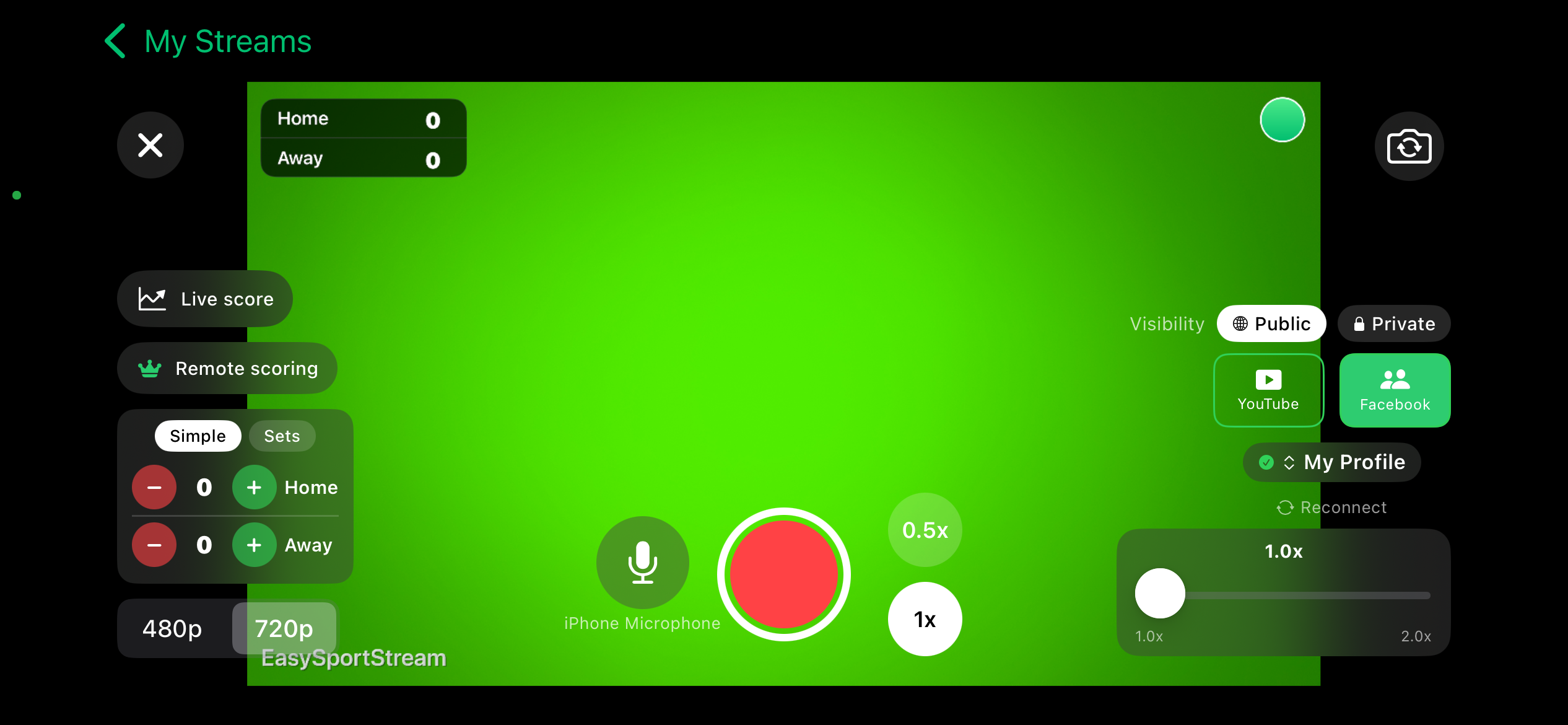
Film the game with your phone, keep the score on the video and stream it to YouTube or Facebook. EasySportStream sets up the same scoreboard for hockey and floorball: a countdown clock and three periods, since both sports use the same period structure in the app.
Scan to open this page on your phone
Hockey or Floorball on EasySportStream at a glance
- Scoring
- One running score per team, changed with + and - taps
- Match clock
- Optional match clock that counts down from 20:00, 3 periods to start with
- Apps
- iOS and Android
- Streams to
- YouTube or Facebook, on your own account
- Scoreboard
- Drawn onto the video by the app, so it shows live and in replays
- Who can watch
- YouTube: Public, Unlisted or Private. Facebook: Public or Private.
- Video quality
- 480p or 720p
- Price
- The app is free and streaming to YouTube or Facebook is free. Remote scoring is part of optional PRO.
- Remote scoring
- A second person updates the score from their own device (PRO)
How it works
- Download the app. Get EasySportStream free from Google Play or the App Store.
- Create a match. Pick Hockey or Floorball and enter the team names. The scoreboard is created for you.
- Go live. Choose YouTube or Facebook, choose who can watch, and tap record.
One setup for both sports
Hockey and floorball start from the same scoreboard setup in EasySportStream: a match clock that counts down from 20:00 and a game split into three periods. Pick whichever sport you are filming when you create the match; the app behaves the same way for both, so this page covers them together instead of repeating itself twice.
The clock counts down to 0:00 and stops there by itself. Move to the next period and it resets to 20:00. Change the number of periods or set the displayed time by hand if a period is already under way.
Scoring by the goal
Both sports score one goal at a time, so the scoreboard changes by one point per tap: + for the team that scored, - to undo a mistake. The overlay updates on the stream as soon as you tap.
Filming and scoring at the same time gets busy in a fast game, which is where remote scoring helps: with EasySportStream PRO, a second person keeps the score from their own device while you stay on the camera.
Filming on a rink or an indoor court
A hockey rink usually has boards and glass around it, so a raised position behind or above the boards gets a clean, steady shot without the barrier in the way. Floorball is played on an indoor court with low boards, so a sideline spot with a clear line to both goals works well.
Both games move fast end to end, so a wide shot that follows play beats a close, hand-held one. Check the venue's power and connection before puck-drop or face-off with the phone setup guide and the match day checklist.
Start streaming hockey or floorball today
Free on iOS and Android. Create a match, go live and share the link.


Frequently asked questions
Can I livestream hockey and floorball with the same app setup?
Yes. Both sports start with the same scoreboard: a 20:00 countdown clock and three periods. Pick the sport when you create the match and the setup is ready.
Does the clock stop when a period ends?
Yes. The clock counts down to 0:00 and stops by itself. Move to the next period to reset it to 20:00, and you can set the time by hand if needed.
How is the score kept during a fast game?
One tap per goal: + for the scoring team, - to undo. With EasySportStream PRO, a second person can keep score remotely from their own device while you film.
Does the period count have to stay at three?
No. Hockey and floorball start with three periods, and you can adjust the number of periods and the displayed time to match your competition's rules.
Can viewers watch privately?
Yes. YouTube offers Public, Unlisted or Private, and Facebook offers Public or Private, so you choose who can watch.
Keep reading
Ready to stream your hockey or floorball match?
Download EasySportStream free and stream from your phone in minutes.